The best nanny share rate calculator? We tested 12, including ours
Sharefully makes the Fair Share Rate Calculator, one of the 12 tools tested here, and we wrote the tests. Tested November 13, 2026.
In short. We ran 12 free nanny share calculators through the same four cases and asked eight yes-or-no questions of each. The Fair Share Rate Calculator by Sharefully answered yes to all eight. Nest Payroll’s calculator answered yes to seven and does not cover a third family. Four of the tools take each family’s planned hours. Ours works one hour at a time. The whole week is the Sharefully app’s job. The method, the raw results and the screenshots are linked at the end.
Why this is harder than it looks
Two families and a nanny sit down to agree on a rate. Someone opens a calculator.
That should settle it. It doesn’t, because the calculators don’t agree.
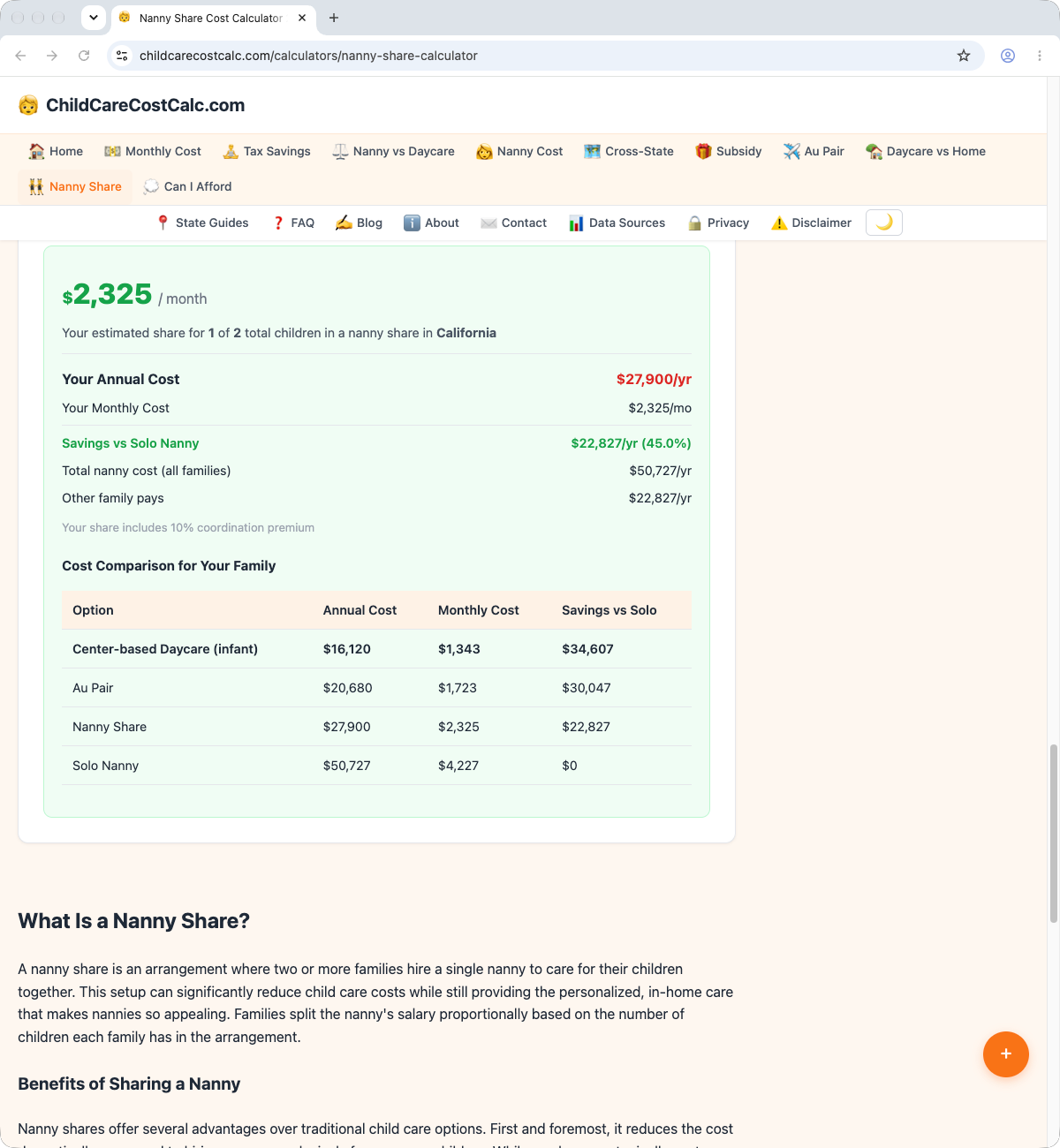
We entered the same share into each tool that would take it: a nanny whose rate for one family is $24 an hour, and two families with one child each. Depending on the tool and its defaults, the share’s pay came out anywhere from the same as one family’s to $40.00 an hour. One tool showed two identical families paying $27,900 and $22,827 a year, depending on which of them was using it. A few pages had arithmetic that does not add up.
So we wrote down what a nanny share rate calculator should be able to answer, and tested every free calculator for US shares that we could find, including our own.
Our pick: the Fair Share Rate Calculator by Sharefully
It is the only tool that answered yes to all eight questions, in both test runs.
- Two families, one child each: hourly pay of $32.00, and $16.00 from each family. On their own, each would pay $24.00.
- One family with two children, one with one: hourly pay of $35.00. The parts are $20.26 and $14.74, each less than that family would pay alone ($27.00 and $24.00).
- Three families: hourly pay of $40.00, and $13.33 from each.
- From either seat: swap the two families and the parts swap with them. Nothing else changes.
It starts from a nanny’s own rate for one family. The share chooses the rule (60%, two-thirds, 70% or 75%), with two-thirds as the starting point. And it says what everyone can count on, with every rule it offers: nannies always earn more than with any one family alone, and every family pays less than it would on its own.
It is free, with no account and no email.
Where it falls short
- It works one hour at a time. It does not add up a week. You run each kind of hour on its own: both children there, one child there.
- No inputs for guaranteed hours, hosting or shared costs. It lists them as things to agree on.
- It is not a budget. It leaves out everything beyond the hourly rate, and says so in its notes.
- The test follows its design. Five of the eight questions match how our calculator was built. Read the other tools’ answers as the news, not ours.
- Cents. With three families the parts came to $39.99 against $40.00. The page says rounding can do that.
- No date on the page. Both runs noted it. Four of the other tools show one. A calculator should say when it was last changed.
For the whole week: the Sharefully app
One hour is the calculator’s job. The whole week is the app’s.
A real week is never the week anyone planned. One child goes home after lunch. A handoff runs late. One family pays for mornings it did not use. Every hour has its own split, and by Friday that is dozens of small sums.
With Sharefully, an adult records each handoff as it happens, and another confirms it with one tap. Each handoff becomes a start or stop time, so nothing rests on memory.
See one week, start to finish · Join the waitlist
The app is not a calculator, so it is not in the table.
If you need to work from a planned week today, four of the tools we tested take each family’s hours. Nest Payroll’s calculator and CalculatorFoundry take the hours the families share and each family’s hours alone. ChildCareCostFinder takes each family’s hours, guaranteed hours and a credit for the family that hosts. Sitter Rank takes each family’s hours and can split by hours used. All four work from the hours you plan. None of these calculators records the hours that happened, and in our experience that is where a week goes wrong.
Also good
- Closest on the rate: Nest Payroll. Yes to seven of eight. It starts from a nanny’s own rate, applies a premium the share can change (1.3 times by default: $31.20 an hour, $15.60 from each family), and handles a second child. It covers two families only. In our automated browser, its last step asked us to prove we were human. We did not try to pass it, and a visitor in an ordinary browser may not see it. We tested the split the page shows before that step.
- Most complete planner: ChildCareCostFinder. Hours by family, guaranteed hours, a host credit, shared supplies, and a date on the page. It asks you for the share’s combined rate and does not work it out from a nanny’s rate. Its default is an even split. Its split by number of children charged a family with two children exactly twice what it charged a family with one ($19.79 and $9.89 an hour).
- For the written agreement: these are not calculators, and we read them without testing them. GTM’s nanny share contract checklist brings nannies into the terms and keeps pay steady when a family is away or a child is sick. The US Department of Labor’s sample agreement for nannies has a nanny share option that every employer signs, and lines for hours and cancelled days.
Why you should trust this, and where you shouldn’t
We make one of the tools. That is a reason to check our work, so we set the test up to be checked.
- One tool was left out. We also found a Swiss calculator priced in francs. One run tested it, and it is not in the table.
- One tool was added later. We added NannyFinder later on the test day, after the first eleven were scored: our search had missed it, and our founder pointed it out. It went through the same questions and the same two runs.
- The questions were written first. We set down the eight questions before the scored runs and did not change them afterwards. We had already read many of these pages while researching, and a trial run used the same questions.
- Two automated runs, by two AI agents that Sharefully set up, tested every tool through its public page, in an automated browser with no window. Both used the same AI model. Each run wrote its own results, and we compared them afterwards. They agreed on 93 of 96 answers. Where they differed, the table shows “~” instead of an answer. That happened three times, and each time one run had said yes: BestBabyCalculators on question 4, Cubb Nanny on question 2 and NannyFinder on question 8.
- Our calculator went through its page like the others.
- Every case we could enter has a screenshot, a saved copy of the page and a file fingerprint. We also saved a public archive copy of each page on the test day; the links are below.
- A “no” is not a mistake. It means the tool uses a different method. We say “error” only for arithmetic that does not add up, or a page that contradicts itself.
- We did not check any tool’s tax or legal content. Several tools add employer costs to their figures. We recorded that they do, and nothing more.
- Defaults matter. Where a tool needed a setting we were not testing, we left its default and wrote it down. Two tools need a state and have none set; we chose California. One tool picked a state from the visitor’s location, which changed only its employer-cost figures.
How we tested
Four cases, the same for every tool:
- Case 1: a nanny’s one-family rate of $24 an hour; two families, one child each.
- Case 2: the same, but Family A has two children and Family B has one. Where a tool has an amount for an extra child, $3. Where a tool needs hours, 40 a week. Every other field at the tool’s default, or California where a state was required.
- Case 2, swapped: Family A has one child and Family B has two.
- Case 3: three families, one child each.
Eight questions, answered from the numbers each page showed:
- Does a nanny earn more in a share than from one family?
- Does each family pay less than it would alone?
- Do the families’ parts add up to hourly pay?
- Do both families see the same split?
- Does a family with two children pay more, but less than twice as much?
- Does a third family raise hourly pay and lower each family’s part?
- Can the share set its own rule?
- Does it start from a nanny’s own one-family rate?
Questions 1, 2, 5 and 6 are our view of what a share should do, and question 8 is how our calculator starts. Our calculator was built to meet them, so its eight yeses are no surprise. The useful part is how each other tool answers each question. We think our view is the right one: a nanny in a share takes on more children, two homes and more people to answer to. A tool that answers “no” has taken a different view.
The scorecard
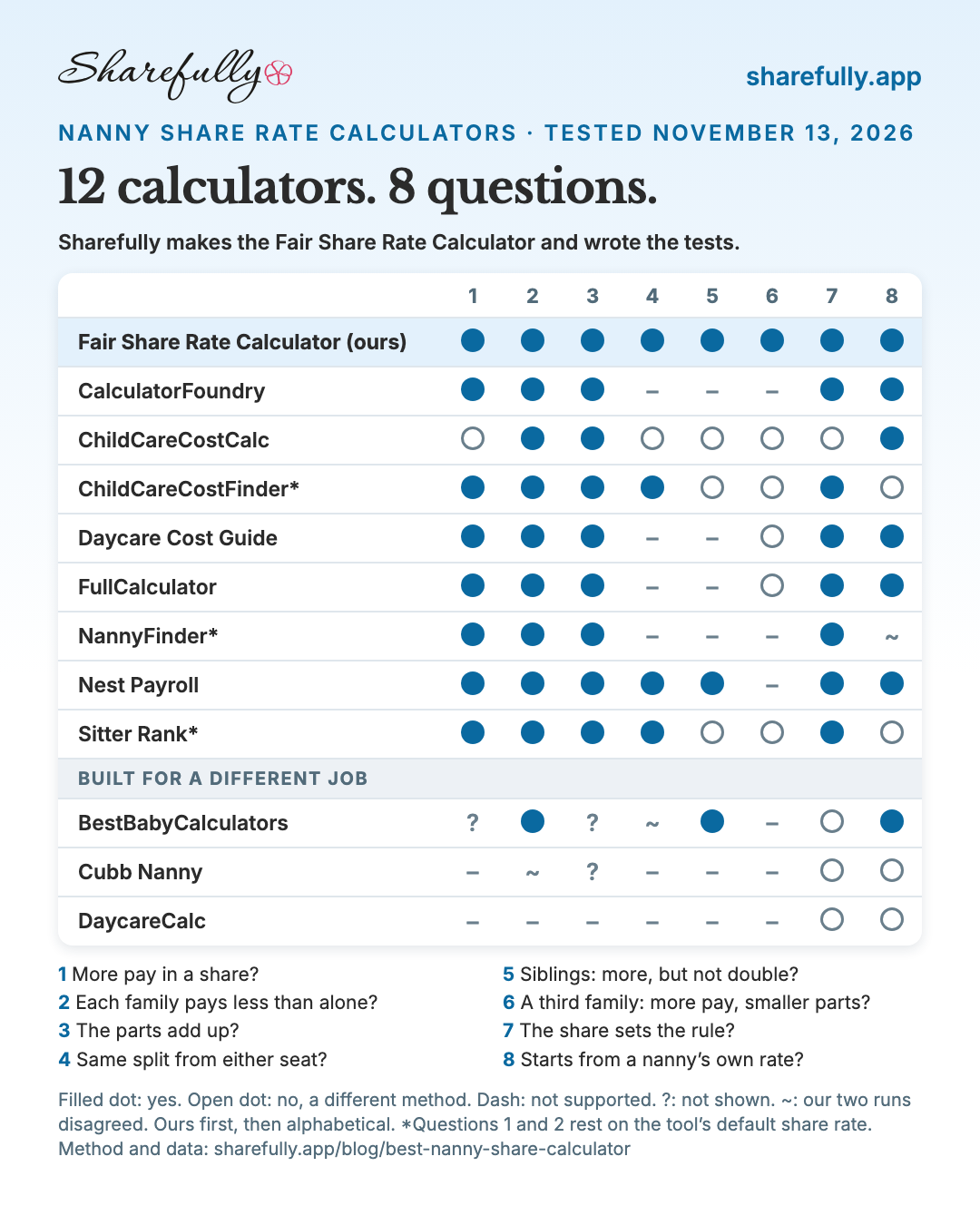
| Tool | 1 | 2 | 3 | 4 | 5 | 6 | 7 | 8 |
|---|---|---|---|---|---|---|---|---|
| Fair Share Rate Calculator (ours) | Yes | Yes | Yes | Yes | Yes | Yes | Yes | Yes |
| CalculatorFoundry | Yes | Yes | Yes | – | – | – | Yes | Yes |
| ChildCareCostCalc | No | Yes | Yes | No | No | No | No | Yes |
| ChildCareCostFinder | Yes | Yes | Yes | Yes | No | No | Yes | No |
| Daycare Cost Guide | Yes | Yes | Yes | – | – | No | Yes | Yes |
| FullCalculator | Yes | Yes | Yes | – | – | No | Yes | Yes |
| NannyFinder | Yes | Yes | Yes | – | – | – | Yes | ~ |
| Nest Payroll | Yes | Yes | Yes | Yes | Yes | – | Yes | Yes |
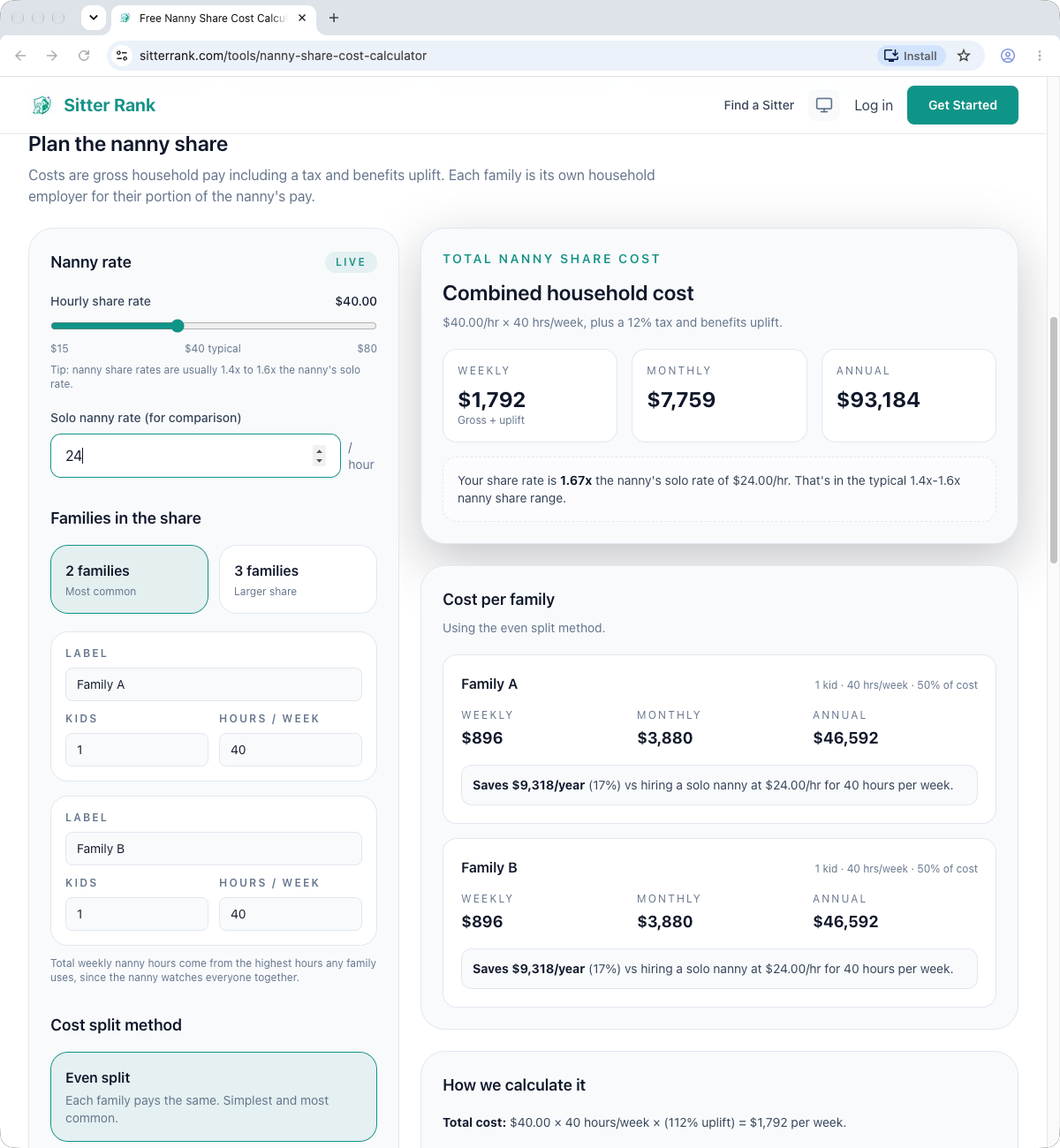
| Sitter Rank | Yes | Yes | Yes | Yes | No | No | Yes | No |
| Built for a different job | 1 | 2 | 3 | 4 | 5 | 6 | 7 | 8 |
|---|---|---|---|---|---|---|---|---|
| BestBabyCalculators | ? | Yes | ? | ~ | Yes | – | No | Yes |
| Cubb Nanny | – | ~ | ? | – | – | – | No | No |
| DaycareCalc | – | – | – | – | – | – | No | No |
Yes, no, “–” for not supported, “?” for not shown, “~” where our two runs disagreed. For ChildCareCostFinder, NannyFinder and Sitter Rank, the answers to questions 1 and 2 rest on the share rate each tool starts with ($29.68, $34 and $40.00). None of the three works the share rate out from a nanny’s rate. Our calculator is first; the others are in alphabetical order. Three tools were built for a different job (comparing daycare with a share, a monthly estimate, one family’s weekly cost), so many of the questions do not apply to them. A dash is not a failure.
The other calculators
- BestBabyCalculators. Shows one result, one family’s weekly cost: no hourly pay and no other family. A second child raises that cost 1.15 times. Its share factor of 0.67 is fixed.
- CalculatorFoundry. $30.00 an hour (a 25% premium you can change), $15.00 from each family before employer costs. It takes the hours the families share and each family’s hours alone, and shows a date on the page. Two families only, and no way to enter different numbers of children.
- ChildCareCostCalc. The total came to $50,727 a year with employer costs (California selected), the same as it shows for one family: no more pay for a second family. Its “10% coordination premium”, which the page says “accounts for the added complexity of a nanny share arrangement”, is added to whichever family is using the tool. Two identical families were shown $27,900 for “you” and $22,827 for the other family. Each family that runs it sees itself paying the larger part.
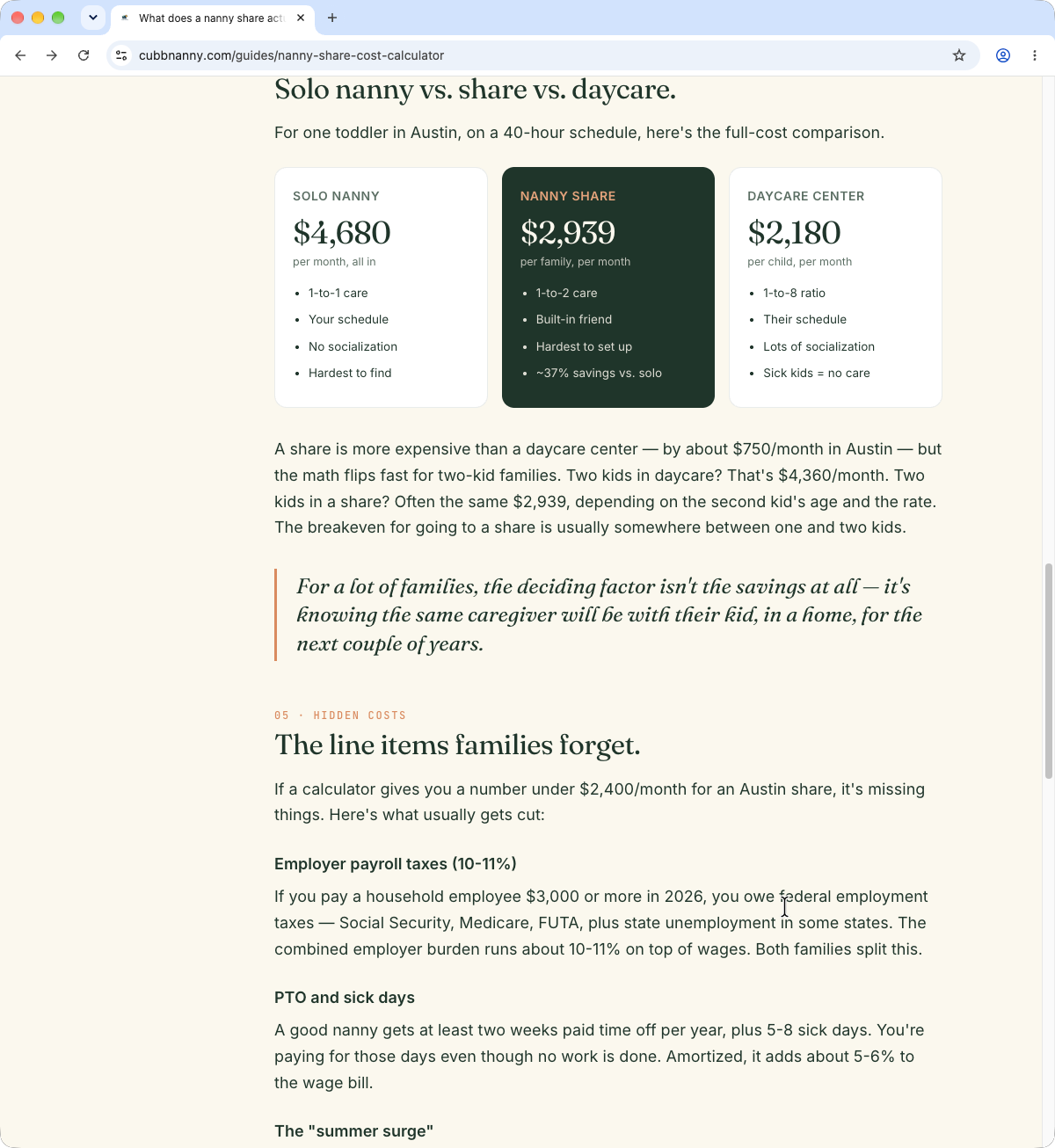
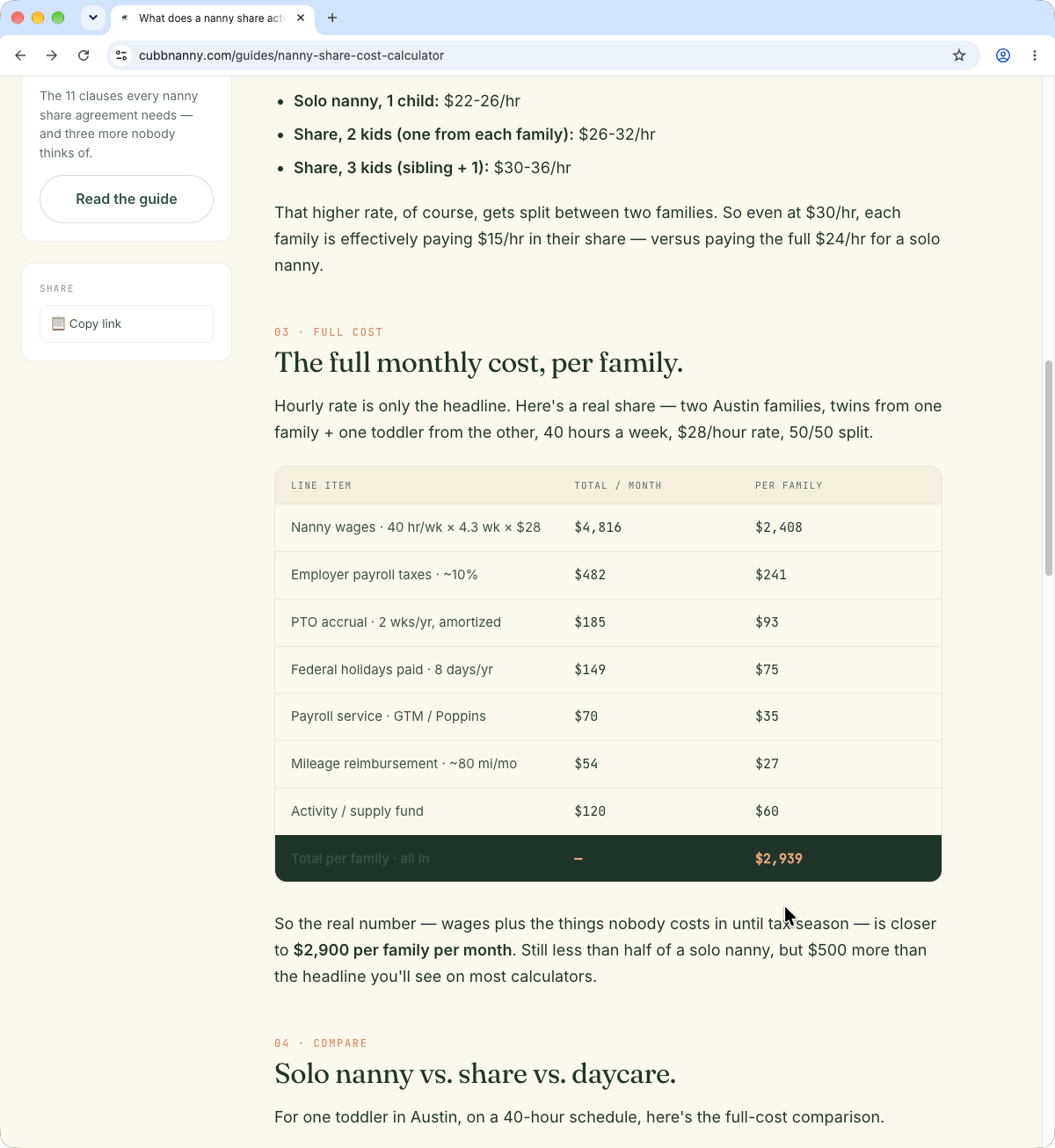
- Cubb Nanny. A monthly estimate from two inputs. It treats the rate you enter as the share’s rate. Its guide works an example share to $2,939 a month per family, “closer to $2,900”, and says: “Still less than half of a solo nanny”. Its own comparison puts a solo nanny at $4,680 a month and the share at “~37% savings vs. solo”. $2,939 is 63% of $4,680.
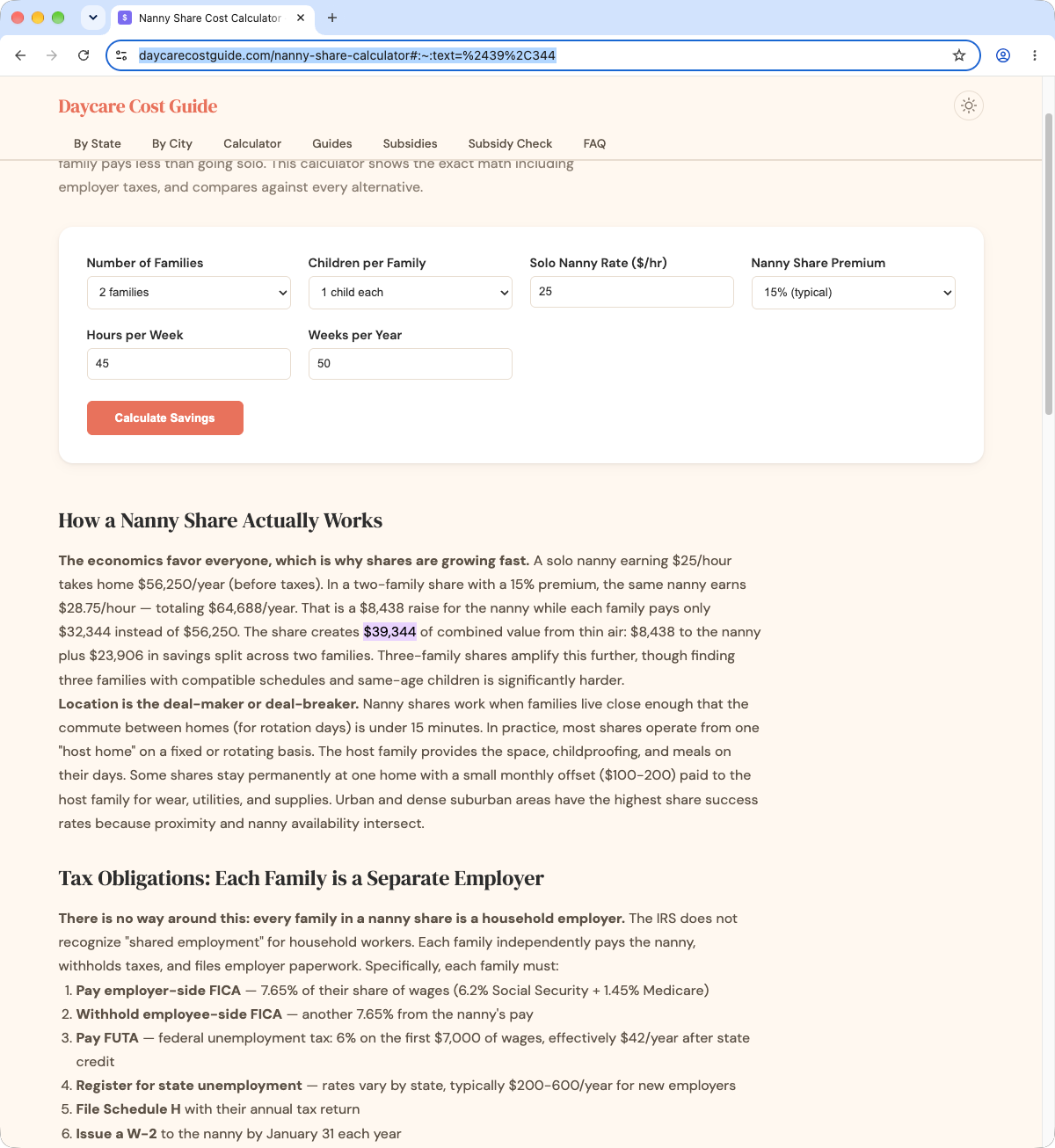
- Daycare Cost Guide. Starts from a nanny’s rate and adds a premium the share can change (15% by default: $27.60 an hour, shown as $28). A third family lowered each family’s part and left hourly pay where it was. In a worked example in its article text, “$8,438 to the nanny plus $23,906 in savings” is given as $39,344 of combined value. The two figures add up to $32,344.
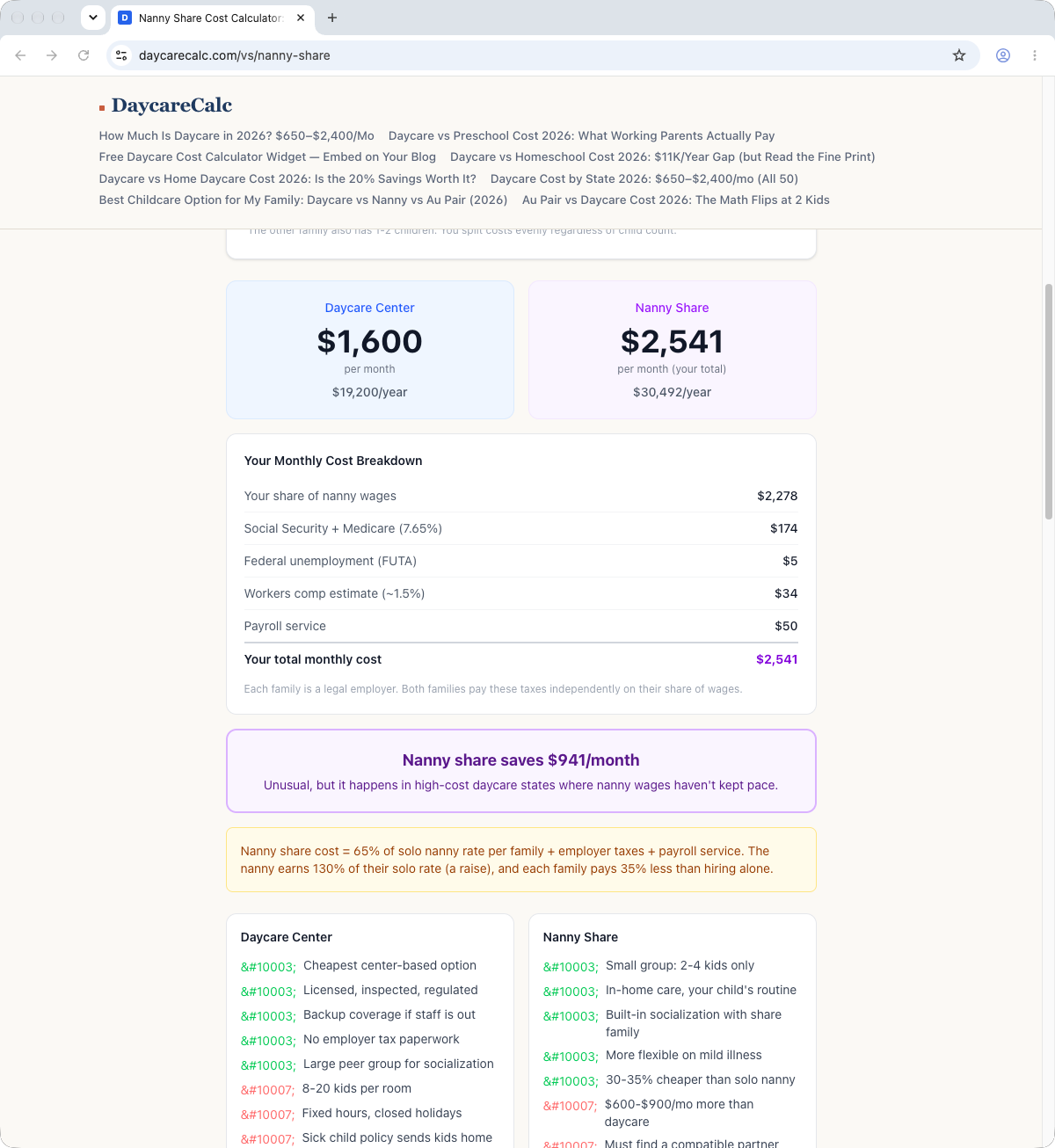
- DaycareCalc. Built to compare daycare with a share for one family; a nanny’s rate cannot be entered. With California selected (the page needs a state), one toddler and 40 hours a week, the page showed daycare at $1,600 a month and a nanny share at $2,541, and then “Nanny share saves $941/month”. By its own figures the share costs $941 more.
- FullCalculator. A 20% increase by default, which you can change. Its “Nanny Total Weekly Pay” of $1,267 includes a 10% allowance for employer costs, so it is more than the share’s pay itself ($1,152 with the allowance set to 0%). A third family left that figure unchanged.
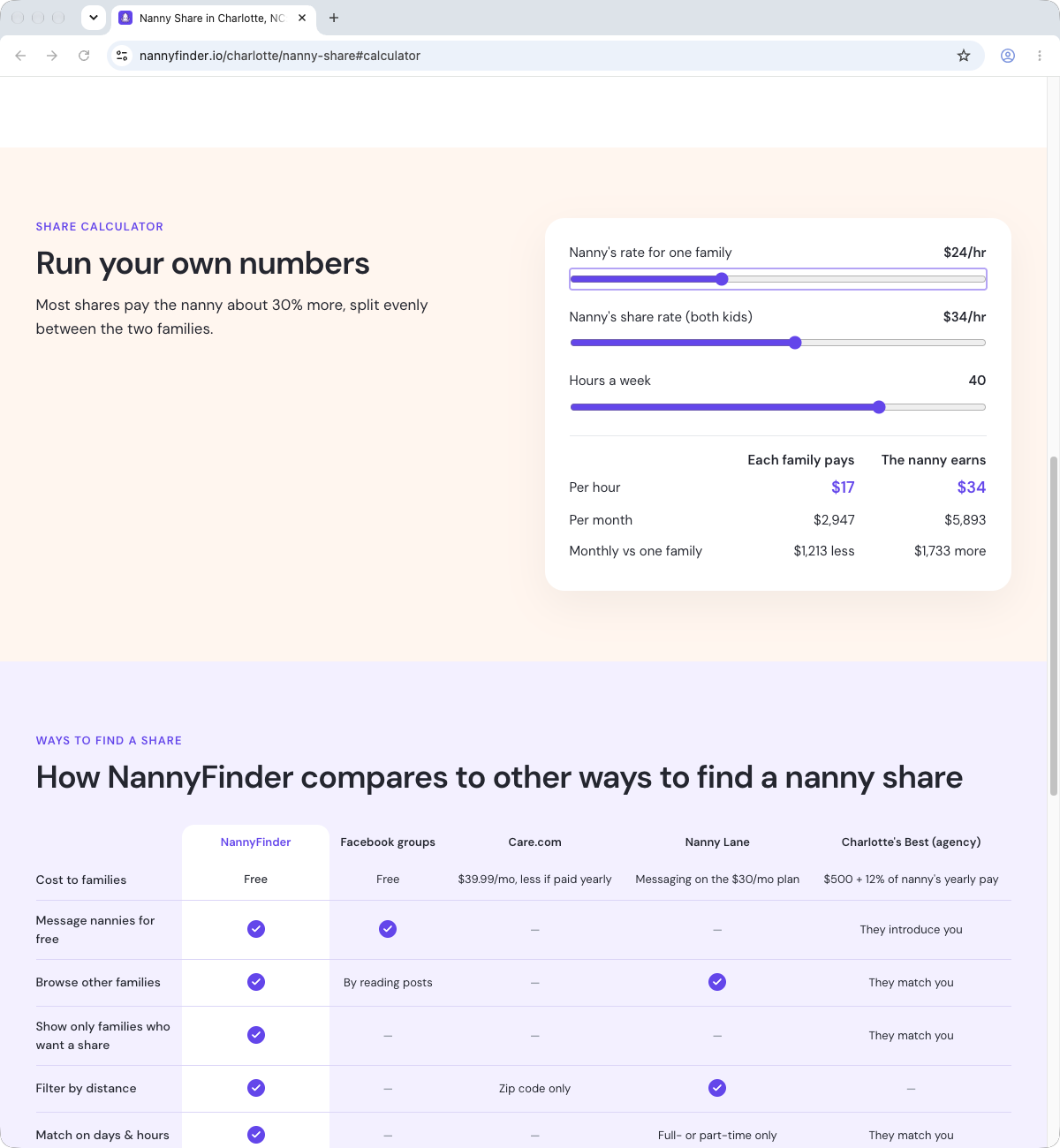
- NannyFinder. Three sliders: a nanny’s rate for one family, the share rate and hours a week. Free, with no account, and the page states its rule: “Most shares pay the nanny about 30% more, split evenly between the two families.” At its starting values ($26 and $34) the figures match that. The share rate is its own slider and does not follow the first one: with $24 entered it stayed at $34, or $17 from each family, until we moved it. Two families and an even split only, with no way to enter children or a third family. Our two runs disagreed on question 8: the first slider is a nanny’s rate for one family, but the result comes from the share rate slider.
- Sitter Rank. Asks for the share’s combined rate (it starts at $40.00) and uses a nanny’s own rate only for comparison. It splits evenly by default, and the share can choose to split by hours, by children or a mix. With $24 entered, the page says the share rate is “1.67x the nanny’s solo rate” and “in the typical 1.4x-1.6x nanny share range”. 1.67 is outside that range.
Two guides worth a note
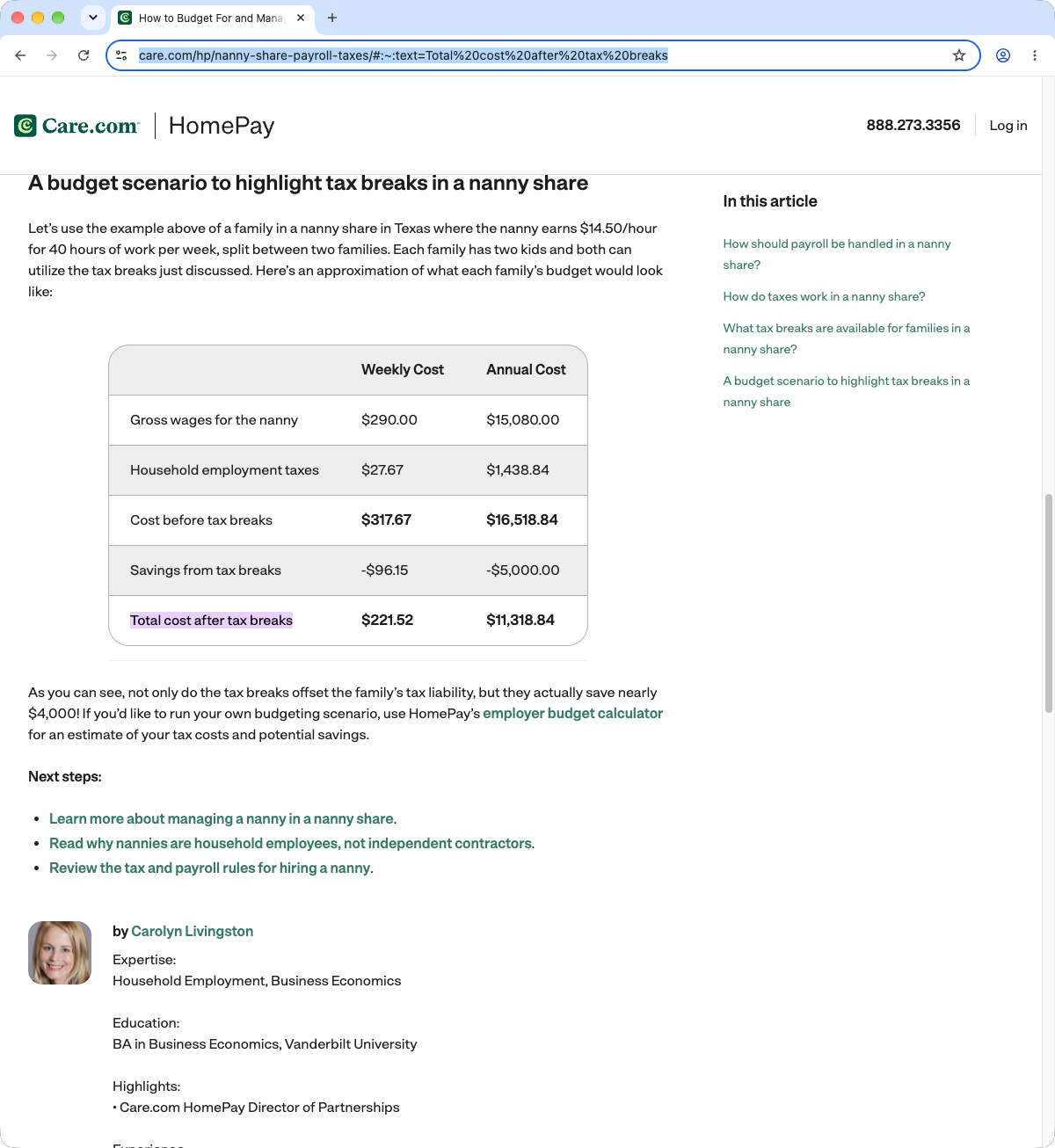
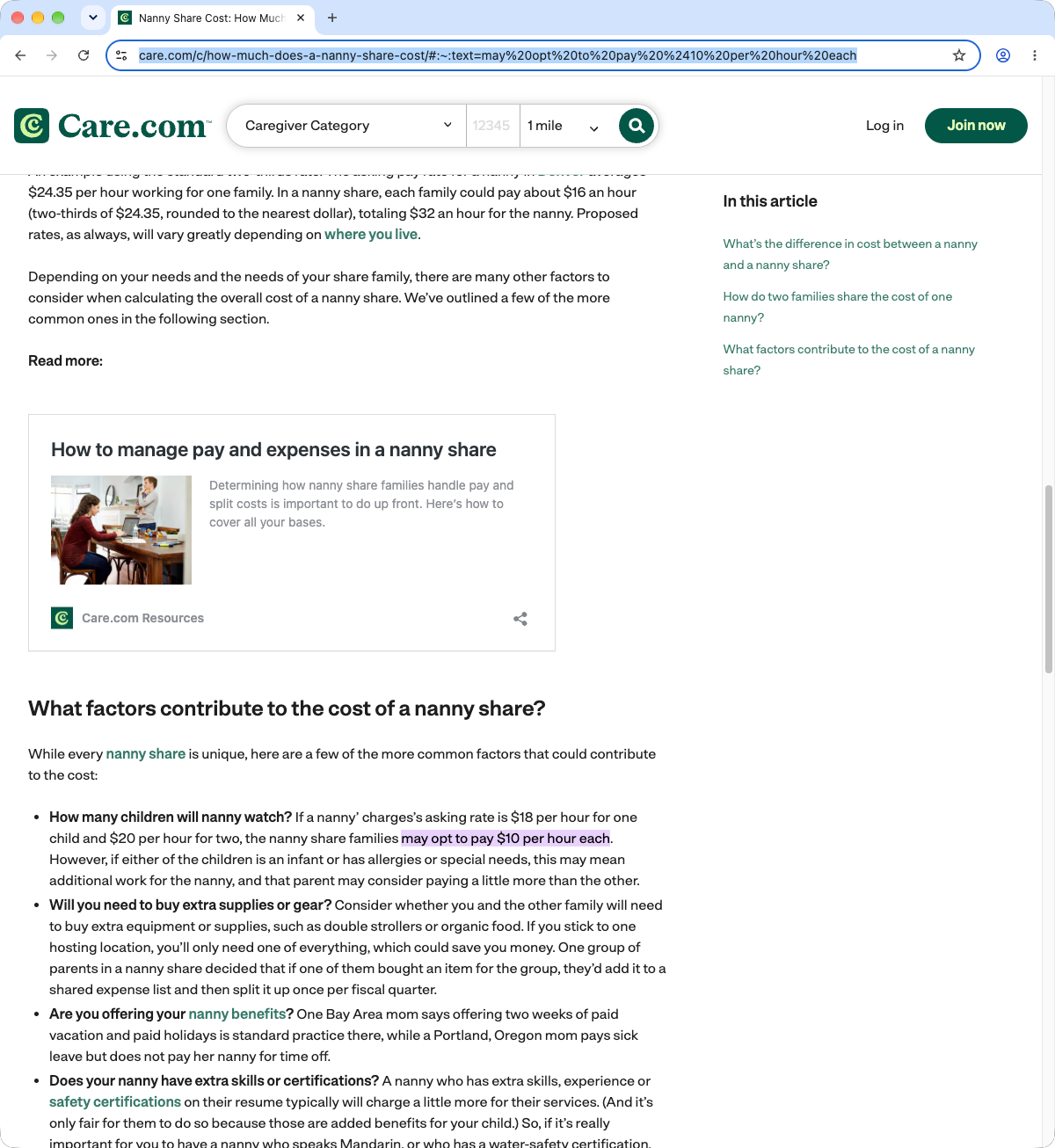
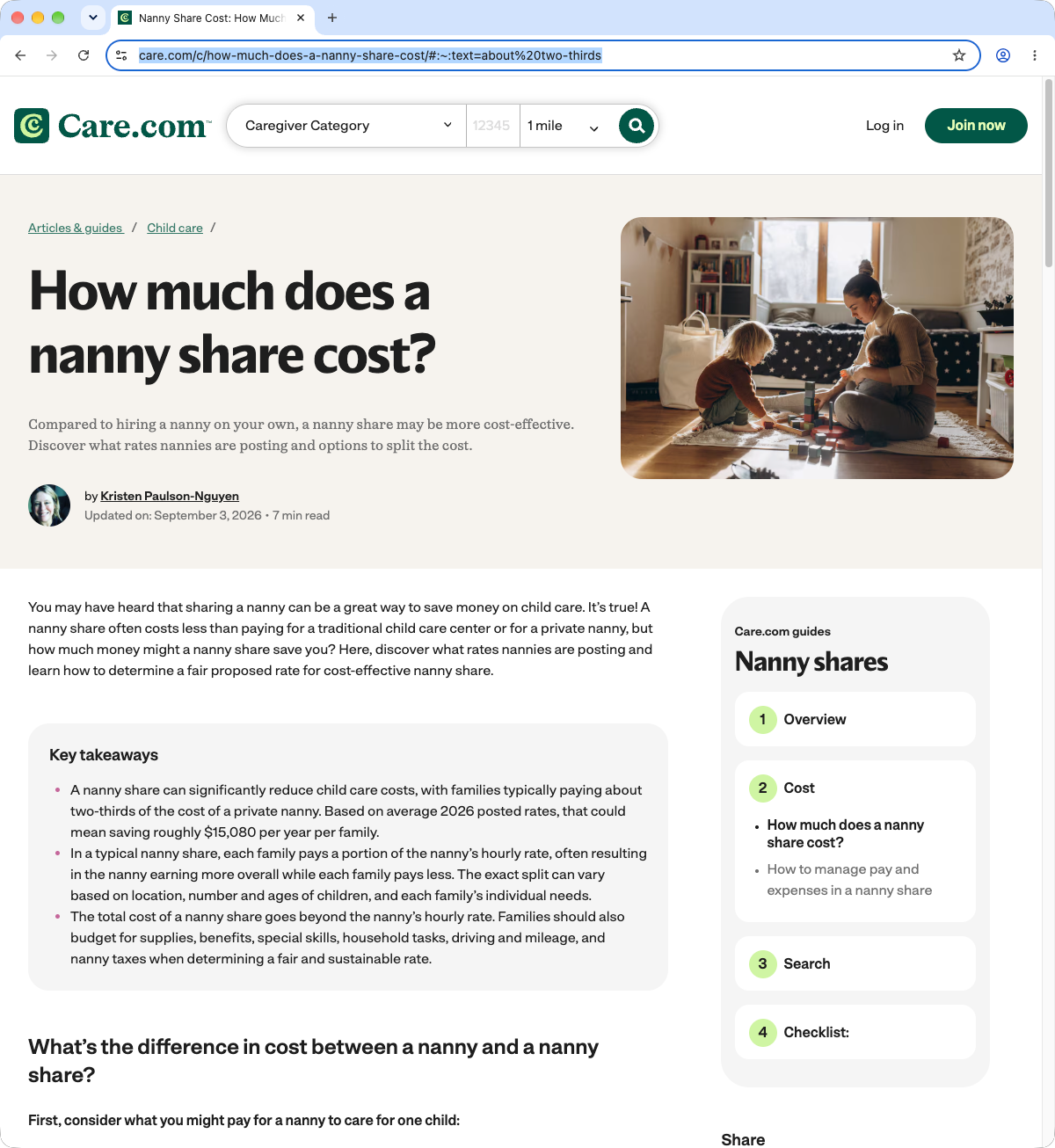
These are guides, not calculators, and they were not part of the test. Care.com’s cost guide says families are “typically paying about two-thirds of the cost of a private nanny”. It also gives an example: if a nanny charges $18 an hour for one child and $20 for two, “the nanny share families may opt to pay $10 per hour each”. That example comes to $20 an hour for two families, $2 more than one family would pay alone. Care.com HomePay’s nanny share budget table gives $16,518.84 less $5,000.00 as $11,318.84. It is $11,518.84. The weekly column of the same table subtracts correctly.
We checked each of these again in an ordinary browser window, with the address bar showing, on November 13, 2026. Each has a dated screenshot, linked below. Pages change. If one of them has been corrected, tell us and we will update this page.
What no calculator can do
A calculator shows how a rate splits. It cannot tell you what the rate should be. The rates are yours. Each nanny share agrees on its own rates, and Sharefully does not set them. The figures are not wage advice.
Start with one hour
Sit down together, nanny and families, and try each kind of hour in your week.
Then read how one hour becomes a week.
Sources and data
- The tools tested: Fair Share Rate Calculator, Nest Payroll, Daycare Cost Guide, Sitter Rank, FullCalculator, CalculatorFoundry, ChildCareCostFinder, BestBabyCalculators, ChildCareCostCalc, DaycareCalc, Cubb Nanny, NannyFinder.
- Method and results: test protocol, run A, run B, results.json, results.csv, NannyFinder run A, NannyFinder run B, archive copies, dated checks.
- Dated screenshots: homepay-budget-table, care-cost-guide-10-each, care-cost-guide-two-thirds, daycarecostguide-39344, cubb-37-percent, cubb-less-than-half, daycarecalc-saves-941, childcarecostcalc-27900-22827, sitterrank-1-67x, nannyfinder-34-stays.
- Guides quoted: Care.com, “How much does a nanny share cost?”; Care.com HomePay, nanny share payroll and taxes; GTM, nanny share contract; US Department of Labor, sample employment agreement for nannies.
- Corrections: hello@sharefully.app.
Built from eight years of nanny sharing. Sharefully is from Charlotte, NC.